I have…
I’m submitting a…
- Regression (a behavior that stopped working in a new release)
- Bug report
- Performance issue
- Documentation issue or request
Current behavior
I am trying to grant access for users to update their own content. I load Squidex into an iframe so the user feels like they are dealing directly with us via vendor-content.selectyourfx.com
However, instead of going directly to the limited access to my application, they start at the “All Apps” Squidex page. This allows them to click on things such as “Assets” and “Settings” when hovering over my App. While "Assets gives a “no permissions” message, clicking “Settings” actually allows them to see the security section, including all contributors, roles, and their associated emails.
Expected behavior
Ideally, users I invite would be sent directly to my app’s dashboard. However, I’d be content with ensuring they do not have access to any of the submenus if they don’t have those permissions under their roles.
Minimal reproduction of the problem
Environment
App Name:
- Self hosted with docker
- Self hosted with IIS
- Self hosted with other version
- Cloud version
Version: [VERSION]
Browser:
- Chrome (desktop)
- Chrome (Android)
- Chrome (iOS)
- Firefox
- Safari (desktop)
- Safari (iOS)
- IE
- Edge
Others:
Have you created a custom role?
This is how squidex works right now: the “all apps” view doesn’t have permission scopes, so users can see app tiles and settings even if the role blocks actions below. Iframe won’t change that because the UI loads before the permission checks start. The only thing I’ve done to get around this is to send users straight to the app URL (not the root) and make a custom role that removes everything but content. This way, even if they poke around, they can’t hurt anything. not perfect, but that’s the safest way to set things up until squidex hides those menus based on roles.
Yes, we have created custom roles and segmented them based on the content we want them to be able to see and edit. All of it works great with the exception of what’s described above.
Thank you, @Carol_Clark that is a helpful tip around the app URL. I’d hired this out originally so I’ll look around and see if it is an easy switch. That will at least reduce the likelihood of interacting with those menus. However, I think I have a few vendor partner CISO’s that will object to being able to see any of these details, especially the emails and names. I’ll likely need to hold back their self-service access until I can find a workaround or a viable spin on the matter!
Which menus exactly are not hidden? Usually it is implemented everywhere, but it is probably an oversight.
But there are a few implicit permissions that are not removeable, because it would break the UI. Perhaps you are running into this.
@Sebastian it is the menus when the user logs in and sees my App on their Dashboard:
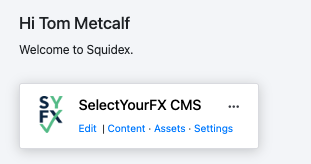
“Content” isn’t a problem.
“Assets” lets them see all assets, not just assets assigned to their role, so I’ve had to turn off those permissions. While it still shows up and is clickable, it gives “You don’t have permission” message.
My main issue is that the User sees “Settings”. When this is clicked, they are able to see much of the settings menu. Particularly problematic would be the list of “Contributors” and their associated emails. They can click on Roles and see a full list of “Clients”, which would include Clients they don’t have permissions to view or edit.
The users see everything that the API would allow them to see. Contributors is needed for the UI. There are other features, such as comments where the contributor list is needed. But users can decide for themselve in the profile settings if they would like to expose their email address.
If you create a custom role, you can also hide these menu items, but it is only a UI thing. Theoretically the users can still go through the API to get all these information.
It seems that Squidex is opening the “All Apps” page in the iframe instead of your app’s dashboard. Make sure that your role permissions are set up correctly, especially for submenus. To fix the iframe problem, you could either send users directly to the app-specific URL or change how Squidex handles sessions in the iframe. You may need to change how authentication is sent.
Squidex does not have any speical behavior when it is running in an iframe. So it is up to youi to load the correct URL.