Implement a way to add suggestions to draft items

Usecase

We need to review blog posts before they are published. For this we often request changes from the author. Currently the only way to provide this feedback is the comment system. However, comments aren’t well suited to review longer blogposts as it’s hard to reference the actual content. It leads to comments such as “In the fourth paragraph in the second sentence you forgot to mention […]”. This can quickly become chaotic and hard to follow up on, especially if multiple people are involved in the review process.

Note: I do understand that you can make suggestions to published items already. This feature proposal is explicitly to improve the process before an item is published. Also there is no way to have different people that propose different changes, it just works for having one differing state from the published state.

Possible Solutions

I personally see two viable solutions, but there may be more.

1: Make it possible to reference text locations from comments

The idea here would be to provide links into the actual content. That way a comment can directly reference a specific location with a rich text field (for example). This is probably the more lightweight approach and easier to implement. The link would basically store the field, location within that field, and version of the content item. In case the field was changed since the link was created, the link would be displayed as “outdated” (it could potentially still open up the history, but the UI should make it clear that the link isn’t about the current version of the content item).

2: Add a way to suggest changes directly

This approach would be more similar to reviews on GitHub PRs / GitLab MRs. You would basically edit the text and propose it as a possible change, which then can be accepted or rejected. I think this would be way harder to implement as it requires the backend to track diverging states of the same content item in case multiple people make different suggestions. So while this would be a really neat feature, I think that simple comments that can reference locations within the content are a lot easier to implement.

Contributing

I can not promise anything, but I am interested to know how complex you think it would be to implement this. If this feature is desired, then I’d at least be interested to try and help with getting this into Squidex (be it by working on the code or even just testing it and giving feedback).

For reference, the discussion where this came up initially as we plan our transition to Squidex:

Good points. I think the rich text editor already has a feature for that, but I will see how it can be improved more.

would it be enough to reference root fields? Nested fields are difficult to reference.

We do use the Components field type for our blog articles, so for our usecase we would need to reference into an array of components, which in turn contain the fields.

The components approach makes it easy to define different structures that authors can use in their articles, like a text section, a download box, an image card and so on. I don’t think there is a way to embed components like this into rich text fields.

I have tried the comment feature of the rich text field, and it’s definitely useful. However the UI only has a one way relationship:

The text is colored and you can click it to see the comment. But you can not jump from the comment to the text.

Not sure if it would be helpful, but I could create some UI mockups of what I have in mind if you’d like.

The problem is that components do not have an ID, you could reference them by index, but it would not be stable.

UI mockups would be absolutely amazing.

That’s why I propose the concept of links getting “outdated”.

Basically the link/reference would store the content version too. If the field (or any parent field/array) was modified since the link was created, then it would show as “outdated”. This is for example how GitHub shows comments that are referencing something from the past, with a “Outdated” badge on the right:

image

I think the same could work in Squidex since it always keeps the content history. The stored index will always be correct within the stored version. You could even display the historic content from that time if a user clicks on the “Outdated” label.

The implication of this approach would be: you can only link to saved content (because only then a history entry exist). This is different from the current rich text comments, where you can create a comment before even saving.

I’ll create them later today

1 Like

Well, that took me way longer than one afternoon. But I’m finally done! :sweat_smile:

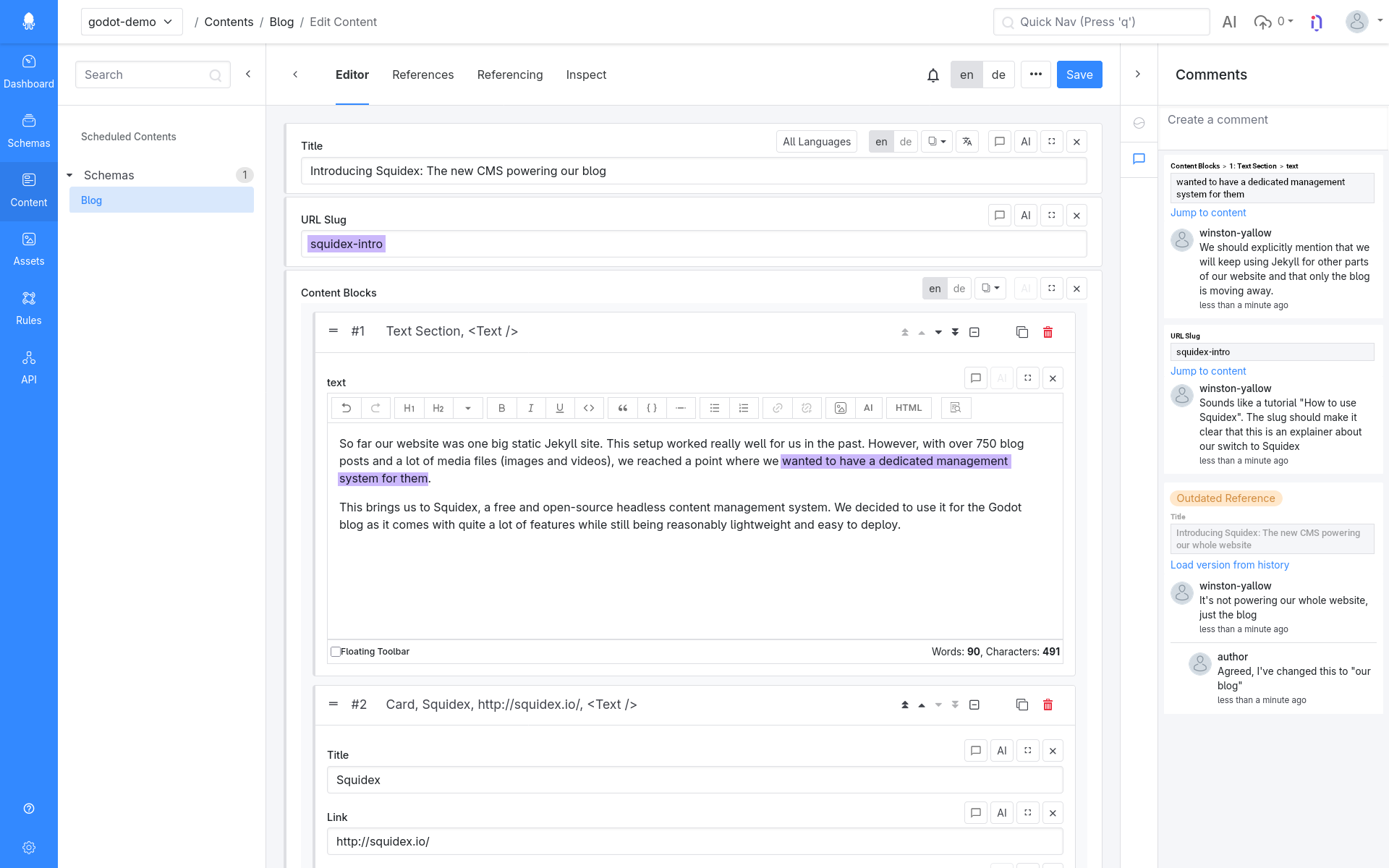
Here is my idea how references can look in the comments. I will go into a lot more details about my thoughts behind the different elements. I tried to structure it a bit for easier reading, I hope it all makes sense.

Comment with Reference

The layout for comments needs to be extended to also contain a reference. The reference should always be shown above the comment. That way anyone reading it will be presented with the context first before reading the comment. If the reference is outdated, this should be made clear as the first thing. I think a CSS .badge-warning could work well for it.

We start the reference with a breadcrumb trail into the content item to communicate to the reader where the referred value exists within the content item. For example, the first reference in the screenshot has a breadcrumb trail “Content Blocks > 1: Text Section > text”. For indices within component lists, it should display both the index and the component name at that index. If the reference is outdated, then the breadcrumb trail should be displayed in a muted color.

This is followed by the referenced value. If the reference is outdated, then this should be displayed in a muted color. The referenced value should always be shown as it was in the version where the reference was made. After all, that is the context that the comment was made for, so it does not make sense to show an updated value here. If the referenced value is too long, then it should be shortened with a “show more” action that opens the full referenced value as a popup.

The last item of the reference section is an action link. This should be “Jump to content” if the reference is still up to date, and otherwise should be “Load version from history”.

Review Comment Button

image

The comment button should be a part of the general action bar for each field. This makes it easy to find for users since the button is at a consistent location regardless of the field type or editor that is displayed.

I would only add this button for “leaf nodes”, or in other words I would hide it on array fields and similar and only show it on the nested fields. I don’t think there is any use for leaving review comments on the container fields, and it would be very hard to display their value in a nice way in the reference section of a comment.

I would personally remove the existing comment button from the rich text field in favor of this new and more flexible system.

Comment Spacing

Very minor detail, but I’ve increased the spacing between comments slightly to better differentiate comment threads from each other.

Behaviour

Unsaved Content

References need to store the version. Therefore they can not be made on unsaved content. If a user clicks on the comment symbol (the one next to the fields, not the normal comments view) while there are unsaved changes in that field, then we should show a popup with a warning text like this:

You can only leave review comments on saved content. Do you want to save the content item in order to continue?
[cancel] [save]

When to mark as outdated

A reference should be considered outdated if the content it references was changed since the version when the reference was created. It should not be considered outdated when only unrelated fields were changed since then.

Referenced values

For rich text fields and similar text based content, the user should have the option to select a substring. For other field types (for example assets, booleans, numbers, etc…) there is no need for any sub-selection. Instead, the whole value should be referenced.

When the user clicks the review comment button on a text field without a substring selected, we should show a popup like this:

Please select the text you want to comment first
[ok]

Highlighted Text

Just like the current implementation of rich text comments, the new system should highlight text that has an associated comment. Clicking it should show the comment.

However, the highlight should not (and can not) be shown for outdated references of course.

Custom editors

I have absolutely no experience with custom field editors. By default I would handle them like any other non-text field by referencing the whole value instead of a substring. Of course it would be nice if we can add some functionality by which custom editors can expose the selected text to Squidex. But as I have no experience here, I am not sure how feasible this would be.

Also a kinda related feature request, but this can be implemented independently: a way to resolve comment (threads). Basically top level comments should have the option “Mark as resolved” in addition to the already existing delete action. Those comments would be collapsed (to not take up space) and sorted at the bottom of the comment list. I would not add this option to replies.

The difference to deletion would be to preserve them, so that users can still read them by clicking “Show resolved”. This would be in line with how GitHub handles conversations on PRs:

image

I thought I’d mention this here as the new system would introduce a bit more clutter into the comment section, so tools to hide the clutter would go nicely together with this proposal. I can create a separate feature request though if that is preferred.

Sounds very good. I am not sure about this point yet:

When to mark as outdated

A reference should be considered outdated if the content it references was changed since the version when the reference was created. It should not be considered outdated when only unrelated fields were changed since then.

We can add a hash or so to the comment to identifiy that. Then we do not have to rely on the version. But you cannot differentiate between array items

Every feedback is welcome.

One problem with just using the hash would be two fields with the same content.

Though thinking about this, what if we store the breadcrumbs trail too in addition to the hash. Then the outdated check would be stored_hash != hash(get_content_at(breadcrumbs_path)) (pseudocode)

I made a first improvement to the comments. But I am not happy yet. Just wanted to let you know.

1 Like